Monaco 에디터 사용해 보기
Web 브라우저에서 VS Code가 사용하는 Monaco 에디터를 사용해 보았다.
Monaco Editor
Monaco Editor는 Microsoft가 VS Code의 소스 코드를 바탕으로 개발한 웹 기반 오픈소스 코드 에디터 라이브러리로, 웹 브라우저 안에서 VS Code와 거의 동일한 강력한 코드 편집 환경을 제공한다.
다양한 프로그래밍 언어에서 IntelliSense, Syntax Highlighting, 코드 자동 완성, 오류 검증, 코드 탐색 기능 등을 지원하고, VS Code light/dark 테마도 기본 제공한다.
아래는 관련 페이지이다.
가장 간단히 테스트해보기 위하여 순수 html과 Java 코드로만 (AI의 도움을 받아서) 구성해 보았다.
index.html 내용
테마, 언어, Minimap 토글, 줄 번호 토글 항목을 넣었고, 그 밑에 에디터 창을 생성하였다.
<!DOCTYPE html>
<html>
<head>
    <meta charset="utf-8"/>
    <title>Monaco Editor test</title>
</head>
<body>
    <h3>Monaco 에디터</h3>
    <label>테마: <select id="theme-select"></select></label>
    <label>언어: <select id="lang-select"></select></label>
    <label><input type="checkbox" id="minimap-toggle">Minimap</label>
    <label><input type="checkbox" id="linenumbers-toggle">Line numbers</label>
    <div id="editor" style="width:800px;height:400px;border:1px solid #ccc"></div>
    <script src="theme.js"></script>
    <script src="snippets.js"></script>
    <script src="monaco.js"></script>
</body>
</html>
monaco.js 내용
Monaco 에디터를 로딩 및 생성하고, 테마와 언어 및 Minimap과 줄 번호를 설정한다. (저장된 값이 있으면 저장된 값으로 설정, 리스너 등록하여 변경 처리)
참고로 아래에서 fontSize 값은 14로 설정하였는데, mouseWheelZoom 값을 true로 설정하였으므로, 아래 캡쳐에서 보듯이 마우스 휠로 쉽게 폰트 크기를 변경할 수 있다.
const MONACO_BASE = "https://cdn.jsdelivr.net/npm/monaco-editor@0.52.2/min/vs";

const loaderScript = document.createElement("script");
loaderScript.src = MONACO_BASE + "/loader.js";
loaderScript.onload = function () {
    require.config({ paths: { vs: MONACO_BASE } });
    require(["vs/editor/editor.main"], initEditor);
};
document.head.appendChild(loaderScript);

function initEditor() {
    defineThemes();

    const themeSelect = document.getElementById("theme-select");
    for (const t of THEMES) {
        themeSelect.add(new Option(t.label, t.id));
    }
    let savedTheme = null;
    try { savedTheme = localStorage.getItem("monaco-theme"); } catch (e) {}
    const initialTheme = THEMES.some(t => t.id === savedTheme) ? savedTheme : "vs";
    themeSelect.value = initialTheme;

    const langSelect = document.getElementById("lang-select");
    for (const [id, s] of Object.entries(SNIPPETS)) {
        langSelect.add(new Option(s.label, id));
    }
    let savedLang = null;
    try { savedLang = localStorage.getItem("monaco-lang"); } catch (e) {}
    const initialLang = savedLang in SNIPPETS ? savedLang : "cpp";
    langSelect.value = initialLang;

    const minimapToggle = document.getElementById("minimap-toggle");
    let savedMinimap = null;
    try { savedMinimap = localStorage.getItem("monaco-minimap"); } catch (e) {}
    const initialMinimap = savedMinimap === "on";
    minimapToggle.checked = initialMinimap;

    const lineNumbersToggle = document.getElementById("linenumbers-toggle");
    let savedLineNumbers = null;
    try { savedLineNumbers = localStorage.getItem("monaco-linenumbers"); } catch (e) {}
    const initialLineNumbers = savedLineNumbers !== "off";
    lineNumbersToggle.checked = initialLineNumbers;

    const editor = monaco.editor.create(document.getElementById("editor"), {
        theme: initialTheme,
        value: SNIPPETS[initialLang].code,
        language: initialLang,
        automaticLayout: true,
        scrollBeyondLastLine: false,
        cursorSurroundingLines: 0,
        minimap: {
            enabled: initialMinimap,
        },
        fontSize: 14,
        lineNumbers: initialLineNumbers ? "on" : "off",
        mouseWheelZoom: true,
    });

    themeSelect.addEventListener("change", function () {
        monaco.editor.setTheme(themeSelect.value);
        try { localStorage.setItem("monaco-theme", themeSelect.value); } catch (e) {}
    });

    langSelect.addEventListener("change", function () {
        monaco.editor.setModelLanguage(editor.getModel(), langSelect.value);
        editor.setValue(SNIPPETS[langSelect.value].code);
        try { localStorage.setItem("monaco-lang", langSelect.value); } catch (e) {}
    });

    minimapToggle.addEventListener("change", function () {
        editor.updateOptions({ minimap: { enabled: minimapToggle.checked } });
        try { localStorage.setItem("monaco-minimap", minimapToggle.checked ? "on" : "off"); } catch (e) {}
    });

    lineNumbersToggle.addEventListener("change", function () {
        editor.updateOptions({ lineNumbers: lineNumbersToggle.checked ? "on" : "off" });
        try { localStorage.setItem("monaco-linenumbers", lineNumbersToggle.checked ? "on" : "off"); } catch (e) {}
    });
}
snippets.js 내용
언어별 예제 코드를 포함한다. (초기 디폴트 입력 내용으로 사용)
const SNIPPETS = {
    cpp: {
        label: "C/C++",
        code: "#include <stdio.h>\n\nint main(int argc, char *argv[])\n{\n    printf(\"Hello, the world!\\n\");\n    return 0;\n}",
    },
    css: {
        label: "CSS",
        code: "body {\n    margin: 0;\n    font-family: sans-serif;\n    color: #aaa;\n}\n\n.greeting {\n    font-size: 1.5rem;\n    background-color: rgba(10, 200, 200, 0.5);\n}\n\n.greeting:hover {\n    color: #f92672;\n}",
    },
    go: {
        label: "Go",
        code: "package main\n\nimport \"fmt\"\n\nfunc greet(name string) string {\n\treturn fmt.Sprintf(\"Hello, %s!\", name)\n}\n\nfunc main() {\n\tfmt.Println(greet(\"world\"))\n}",
    },
    java: {
        label: "Java",
        code: "public class Main {\n\tpublic static void main(String[] args) {\n\t\tSystem.out.println(\"Hello, the world!\");\n\t}\n}",
    },
    javascript: {
        label: "JavaScript",
        code: "function greet(name) {\n\treturn `Hello, ${name}!`;\n}\n\nconsole.log(greet(\"world\"));",
    },
    json: {
        label: "JSON",
        code: "{\n    \"name\": \"world\",\n    \"greeting\": \"Hello, the world!\",\n    \"version\": 1,\n    \"tags\": [\"sample\", \"json\"],\n    \"enabled\": true,\n    \"extra\": null\n}",
    },
    python: {
        label: "Python",
        code: "def greet(name):\n    return f\"Hello, {name}!\"\n\nif __name__ == \"__main__\":\n    print(greet(\"world\"))",
    },
    shell: {
        label: "Shell",
        code: "#!/bin/bash\n\nname=\"${1:-world}\"\necho \"Hello, ${name}!\"",
    },
};
theme.js 내용
Monaco 에디터가 제공하는 기본 테마에 이어서 Monokai, Dracula 테마를 추가한다.
const THEMES = [
    { id: "vs", label: "Light (vs)" },
    { id: "vs-dark", label: "Dark (vs-dark)" },
    { id: "hc-black", label: "High Contrast Dark" },
    {
        id: "monokai",
        label: "Monokai",
        definition: {
            base: "vs-dark",
            inherit: true,
            rules: [
                { token: "", foreground: "F8F8F2", background: "272822" },
                { token: "comment", foreground: "75715E", fontStyle: "italic" },
                { token: "string", foreground: "E6DB74" },
                { token: "number", foreground: "AE81FF" },
                { token: "keyword", foreground: "F92672" },
                { token: "keyword.directive", foreground: "F92672" },
                { token: "type", foreground: "66D9EF", fontStyle: "italic" },
                { token: "delimiter", foreground: "F8F8F2" },
                { token: "operator", foreground: "F92672" },
                { token: "identifier", foreground: "F8F8F2" },
            ],
            colors: {
                "editor.background": "#272822",
                "editor.foreground": "#F8F8F2",
                "editor.lineHighlightBackground": "#3E3D32",
                "editor.selectionBackground": "#49483E",
                "editorCursor.foreground": "#F8F8F0",
                "editorLineNumber.foreground": "#90908A",
                "editorLineNumber.activeForeground": "#F8F8F2",
            },
        },
    },
    {
        id: "dracula",
        label: "Dracula",
        definition: {
            base: "vs-dark",
            inherit: true,
            rules: [
                { token: "", foreground: "F8F8F2", background: "282A36" },
                { token: "comment", foreground: "6272A4", fontStyle: "italic" },
                { token: "string", foreground: "F1FA8C" },
                { token: "number", foreground: "BD93F9" },
                { token: "keyword", foreground: "FF79C6" },
                { token: "keyword.directive", foreground: "FF79C6" },
                { token: "type", foreground: "8BE9FD", fontStyle: "italic" },
                { token: "delimiter", foreground: "F8F8F2" },
                { token: "operator", foreground: "FF79C6" },
                { token: "identifier", foreground: "F8F8F2" },
            ],
            colors: {
                "editor.background": "#282A36",
                "editor.foreground": "#F8F8F2",
                "editor.lineHighlightBackground": "#44475A",
                "editor.selectionBackground": "#44475A",
                "editorCursor.foreground": "#F8F8F0",
                "editorLineNumber.foreground": "#6272A4",
                "editorLineNumber.activeForeground": "#F8F8F2",
            },
        },
    },
];

function defineThemes() {
    for (const t of THEMES) {
        if (t.definition) {
            monaco.editor.defineTheme(t.id, t.definition);
        }
    }
}
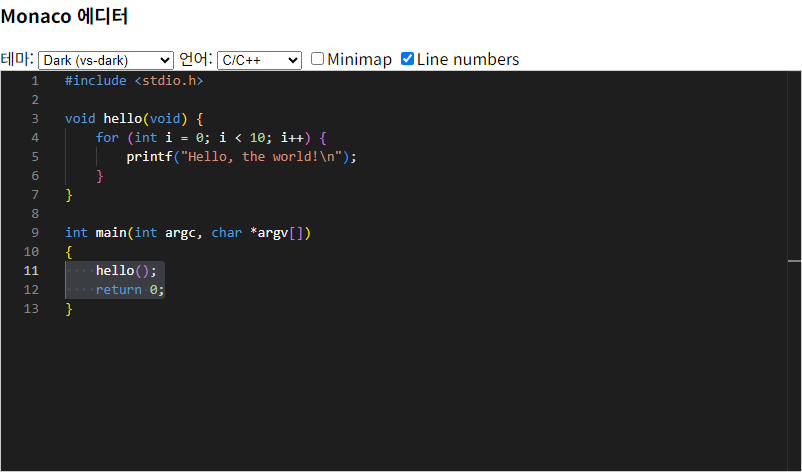
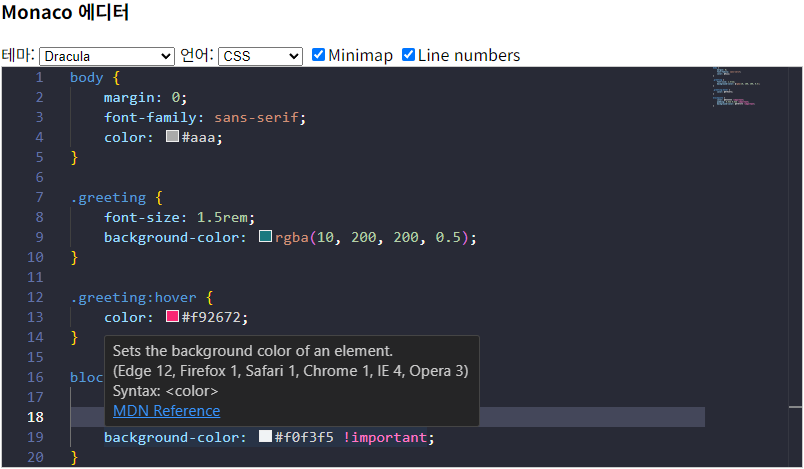
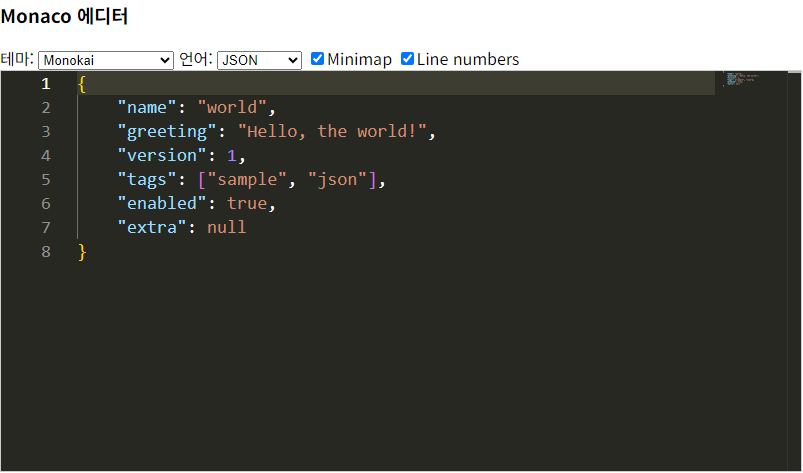
테스트 예제
- C/C++ 예
- CSS 예
- JSON 예
맺음말
VS Code가 사용하는 훌륭한 에디터를 이렇게 쉽게 빠르고 사용할 수 있었다. Web 브라우저는 물론이고 Web App에도 사용할 수 있어서, 강력한 에디터 기능이 필요한 경우에는 Monaco 에디터를 고려해 보는 것도 좋을 것 같다. 😊